Welcome to TabStar! |
Designed to make guitar tablature quick and easy to create |
| |
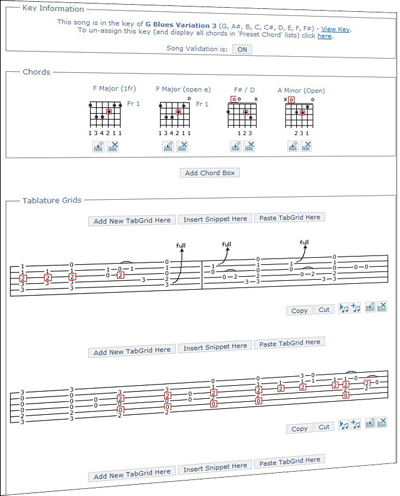
Create great looking guitar tabs like this: |
| |
 |
| |
| |
| |
Use TabStar's Song Validation and KeyFinder to help you identify notes outside your chosen key: |
| |
| You can analyze your song using TabStar's KeyFinder and highlight all the notes
in your Chord Boxes and Tablature Grids which are not in your chosen key. This can be a
massive help in keeping all your songs and snippets in the correct key, or when writing
pieces to a specific key. This feature is available to holders of the Full Account. You
can read all about it on the
Song Validation Help Page. |
| |
| |
 |
| |
 |
| |
| |
With TabStar you can convert all your guitar tabs in to High Quality PDF's: |
| |
| TabStar makes it easy to create ultra-high quality PDF guitar tablature sheet music from any of the
tabs you have in your own personal guitar tab archive. These high quality PDF guitar tabs
are perfect for printing on any printer, or for easy sharing or storing on your local pc.
You can even copy them on to your mobile phone if it supports PDF's and take your songs with
you to band rehersals. Read how to do it in the
Creating PDF's Help Page.
Check out this example PDF file created from the demo song: |
| |
|
|
| |
| |
TabStar's site features:
- Create high quality tablature and guitar sheet music
- Use an intuitive drag and drop interface
- Upload and manage sound files associated with the bars of your songs
- Access your sheet music from any pc with an internet connection at any time
- Parse ugly/difficult to read external tabs into TabStar's parsing engine to create high
quality readable guitar sheet music
- Create and share your own Guitar Tab Archive!
- Have KeyFinder analyse your sheet music and give you key and chord suggestions
- TabStar contains a vast 'Key/Scale Reference' section with hundreds of chords grouped by key which
can be linked from your own songs using KeyFinder!
- Benefit from the vast choice of chords in 'Preset Chord' drop down lists
- Use TabStar's Sharing Centre to share your guitar tabs and work collaboratively
on songs with complete control over who can see your shared songs and who can edit them
- Use Snippet Manager to record your ideas, no matter how small, to keep
them safe until you are ready to develop them in to a new song, or incorporate them into existing songs
- Convert your guitar tabs in to Ultra-High Quality PDFs.
See an example here:
- Validate your songs against your chosen key using Song Validation
and let TabStar highlight notes which fall outside the key helping you create accurate songs every time.
|
Shortcuts to help you build songs faster:
- Choose pre-defined chords to save creating them by hand
- Drag and drop entire chords on to the Tablature Grids using the chord lists
- Dropped chords can be pulled appart to help create single note picking sections
- Chords added to songs appear in the Your Chords list of each Tablature Grid
- Sound files can be associated with bars to help you remember how parts were originally intended to sound
- KeyFinder can limit choices in drop down lists to only those in your specified (or found) key
- Use the Cut/Copy/Paste features in the Create Tablature page to quickly build songs as there is no need to
drag out repeating bars, just copy and paste!
- Snippet Manager's integration in to the Create Tablature page means you can insert whole snippets at any
point in any song you are creating
- You can use TabStar's Sharing Centre to share your guitar tablature with your
friends and allow them to edit it (if you wish) so you can work collaboratively to build your sheet music quicker
|
|
| |
| |
TabStar's Website Parser |
| |
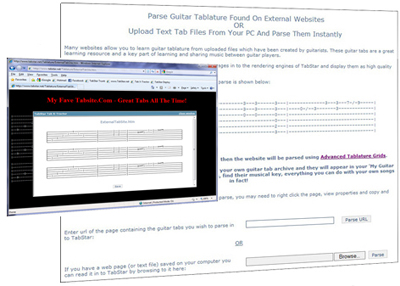
Using TabStar's website parser you can read in the content of external
tablature websites with content similar to the block below and convert them in to high quality tablature automatically.
Simply go to the
Parser page, enter the url you wish to read in
and click 'Parse'. You can read in whole songs at a time!
If you have saved HTML or Text File Tabs on your pc's hard drive, you can use TabStar's parser
to convert them in to high quality tablature too. Holder's of the Full Account
can parse
them using Advanced Tablature Grids
and can save them in to your own guitar tablature archive,
view them as PDF,
find their musical key
and do everything you can do with your own songs! |
| |
| |
| With TabStar guitar tabs on the web no longer have to look like this: |
| |
e--------------5------------5---|--10p-8-----------------------------|
b--------------5---8p5---8b-----|-------10--10p-8--------7p5---------|
g-------------------------------|-----------------9p-7\5-7p5---------|
d--------5--7b------------------|-----------------------------7-5h7--|
a--/--7-------------------------|------------------------------------|
e-------------------------------|------------------------------------|
|
They can look like professional high quality tabs like this:
- click the Edit button to try it out! |
| |
| |
| |
|
| |
The Tablature Grid shown above is a full featured grid (the same as the ones available to holders
of the Full Account) - click the Edit button (the image of a pencil writing on tab) to change it in to
Edit Mode and see how easy it is to create your own guitar tabs using easy Drag and Drop.
Click the Play button (the image with a play triangle and a musical note) to listen to the sound file I've associated with this bar - by associating
sound files you'll never forget how that guitar tab was meant to sound! |
| |
| |
| |
Create an Account and start creating your own guitar tablature archive right away - it's free! |
| |
| We recommend you have a quick glance over the Creating Chords help page
and also the Creating Tablature Grids
help page - it will take only a few seconds...
Although the Chord Boxes and Tablature Grids are simple to use, the help pages contain useful tips and tricks to get you creating your songs faster, quicker! |
| |
| If you feel you require additional features you could consider one of the paid accounts, full details of all levels of use
are found in the Account Information pages.
Remember we value any Feedback or Suggestions you may have.
Please enjoy using the site and tell your friends! |
| |
| |
| |
TabStar's Sharing Centre: |
| |
| TabStar's Sharing Centre lets you share songs and snippets you are working on with your friends
and other band members, and also lets you view your friends songs and snippets. |
| |
| By setting up which of your sharing contacts can edit a shared song you can work collaboratively on songs, or if you don't
want certain contacts to be able to edit they can just view your shared song. |
| |
| You can
create an account or upgrade an existing account on the
Create Account page if you want to take advantage of these extra features,
your account will only take a few minutes to set up. |
| |
| You can read about the Sharing Centre on the Sharing
Centre Help Page. |
| |
| |
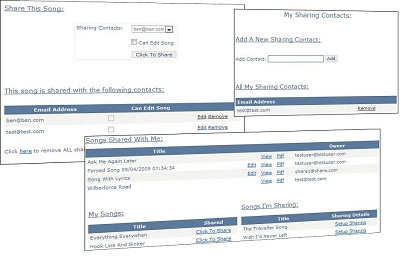
| The screen shot below shows the main areas of the Sharing Centre homepage: |
| |
| |
 |
|
| |
| |
| |
TabStar's Snippet Manager: |
| |
| TabStar's Snippet Manager lets you record all of your ideas, no matter how small, when you think of them and keep them safe.
You can upload sound files so you never forget how
they are meant to sound and KeyFinder can analyse them and tell you what key they are in too. |
| |
| You can store and access your Snippets in the same way you create your full tab songs. If you have a snippet of a chorus,
or an intro, or solo, you can insert them directly into your songs at any point as Snippet Manager integrates
perfectly in to the Create Tablature page. |
| |
| Nobody writes a masterpiece in one go, and with Snippet Manager you can store, access, and use all of your master-piece's
(terrible pun!) at the click of a mouse. |
| |
| You can read about snippets on the Snippet Manager Help Page. |
| |
| Snippet Manager is an advanced feature of TabStar. You can upgrade your account or create a new account with
the extra features like Snippet Manager enabled.
Please visit the Create Account page if you want to take advantage of these
extra features, your account will only take a few minutes to set up. |
| |
| The screen shot below shows the Snippet Manager page: |
| |
 |
| |
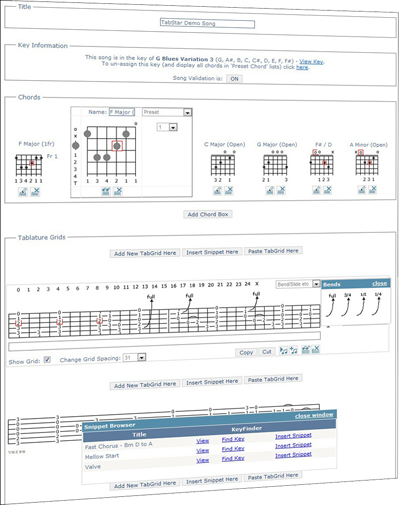
| The screenshot below shows the seamless integration of Snippet Manager and the Create Tablature page. Clicking 'Add Snippet'
will pop up the 'Snippet Browser' window where you can select a snippet to add. Clicking 'Insert Snippet' will
import the entire snippet, all bars and chords, and insert them at the desired location in your song: |
| |
 |
| |
| |
|
| |
| |